
Package Cleaner for macOS
Struggling with disk space? Package Cleaner scans your development directories and identifies package manager folders across multiple languages and frameworks, letting you safely remove them to reclaim storage.
Package Cleaner for macOS

Introduction
I was struggling on my old computer to arrange enough storage space to play around with new projects. Then I remembered something: I have dozens of repositories and projects installed on this machine, and each one has its own package manager directories filled with dependencies. Cleaning those directories would give me significant space back.
That realization led to Package Cleaner, a native macOS application that helps developers reclaim disk space by finding and removing package dependency directories like node_modules, vendor, target, and more. If you are struggling with similar storage issues, or if you simply prefer keeping your project directories clean, this tool will help.
The application scans your development directories, identifies package manager folders across multiple languages and frameworks, and lets you safely remove them with a single click. Since dependencies can always be reinstalled with a simple command, removing these directories is a safe way to reclaim substantial disk space.
Note: This project is a native macOS application built with Swift and SwiftUI. It runs entirely offline with no telemetry or data collection.
The Problem
Modern development projects accumulate significant disk space in dependency directories:
- A typical Node.js project's
node_modulesfolder can easily exceed 500MB - Rust projects store compiled artifacts in
targetdirectories that grow with each build - Python virtual environments contain complete interpreter copies
- iOS projects with CocoaPods can have massive
Podsdirectories
When you have dozens or hundreds of projects on your machine, these directories add up quickly. A developer workstation can easily have 50-100GB consumed by package directories alone.
The challenge is finding and managing these directories across different project types. Manually navigating to each project and running cleanup commands is tedious and error-prone.
Solution
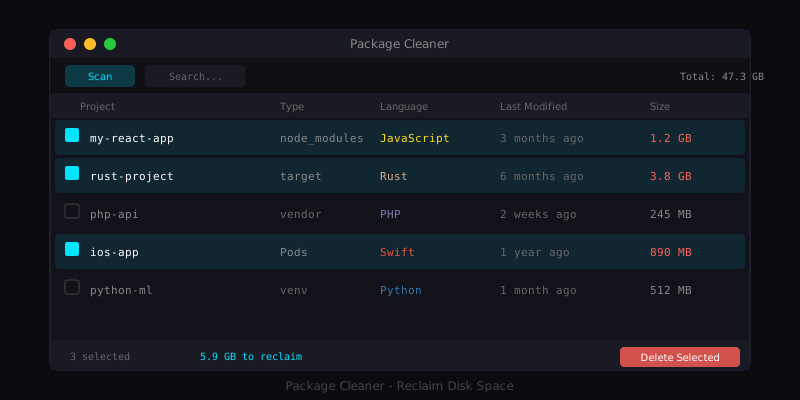
Package Cleaner provides a unified interface for managing package directories across all your projects:
- Scan - Point it at your development directories and let it find all package folders
- Review - See project metadata, last activity dates, and disk usage
- Clean - Select directories and remove them safely (moved to Trash by default)
The application supports multiple languages and frameworks, recognizing the package directory patterns for each:
| Directory                      | Language/Framework                |
|--------------------------------|-----------------------------------|
| node_modules                   | Node.js, JavaScript, TypeScript   |
| vendor                         | PHP (Composer), Go, Ruby          |
| .gradle, build                 | Java, Kotlin, Android (Gradle)    |
| target                         | Rust (Cargo), Java (Maven)        |
| Pods                           | iOS, macOS (CocoaPods)            |
| venv, .venv, __pycache__       | Python                            |
| packages                       | .NET (NuGet)                      |
| .pub-cache                     | Dart, Flutter                     |
Features
Smart Detection
The scanner identifies package directories based on their names and context. It understands that a vendor directory in a PHP project (with composer.json) is different from a vendor directory in a Go project (with go.mod).
Project Insights
For each discovered directory, the application shows:
- Project name - Derived from the parent directory
- Language/Framework - Detected from project files
- Last activity - When the project was last modified
- Disk usage - Size of the package directory
This information helps you make informed decisions about what to clean. Old projects you have not touched in months are prime candidates for cleanup.
Flexible Filtering
Filter the results by:
- Language - Show only Node.js, Python, Rust, etc.
- Type - Filter by package directory type
- Age - Find projects not modified in X days
- Search - Find specific projects by name
Safe Cleanup
By default, deleted directories are moved to Trash rather than permanently deleted. This provides a safety net if you accidentally remove something you needed. You can always restore from Trash or simply reinstall dependencies.
Privacy First
The application runs entirely offline. There is no telemetry, no analytics, no data collection. Your project information stays on your machine.
Technical Implementation
Built with Swift and SwiftUI
Package Cleaner is a native macOS application built with Swift 5.9+ and SwiftUI. This provides:
- Native performance and low resource usage
- Proper macOS integration (menubar, keyboard shortcuts, etc.)
- Modern, responsive user interface
- No runtime dependencies or interpreters
File System Scanning
The scanner uses efficient file system APIs to traverse directories:
func scanDirectory(_ url: URL) async throws -> [PackageDirectory] {
    var results: [PackageDirectory] = []

    let enumerator = FileManager.default.enumerator(
        at: url,
        includingPropertiesForKeys: [.isDirectoryKey, .contentModificationDateKey],
        options: [.skipsHiddenFiles]
    )

    while let fileURL = enumerator?.nextObject() as? URL {
        if isPackageDirectory(fileURL) {
            let info = try await gatherDirectoryInfo(fileURL)
            results.append(info)
            enumerator?.skipDescendants() // Don't scan inside package dirs
        }
    }

    return results
}
The scanner skips hidden files and stops descending into package directories once found, making the scan efficient even for large directory trees.
Size Calculation
Calculating directory sizes accurately requires summing all contained files:
func calculateDirectorySize(_ url: URL) throws -> Int64 {
    var totalSize: Int64 = 0

    let enumerator = FileManager.default.enumerator(
        at: url,
        includingPropertiesForKeys: [.fileSizeKey, .isRegularFileKey]
    )

    while let fileURL = enumerator?.nextObject() as? URL {
        let resourceValues = try fileURL.resourceValues(forKeys: [.fileSizeKey, .isRegularFileKey])
        if resourceValues.isRegularFile == true {
            totalSize += Int64(resourceValues.fileSize ?? 0)
        }
    }

    return totalSize
}
This provides accurate size information rather than relying on potentially stale metadata.
Safe Deletion
Deletion uses the macOS Trash API for safety:
func moveToTrash(_ url: URL) throws {
    try FileManager.default.trashItem(at: url, resultingItemURL: nil)
}
This ensures deleted items can be recovered if needed.
Installation
Download (Recommended)
- Download the latest
Package.Cleaner.zipfrom Releases - Unzip and move
Package Cleaner.appto/Applications - Right-click the app and select "Open" on first launch (required for unsigned apps)
Build from Source
git clone [email protected]:Raspiska-Ltd/package-cleaner.git
cd package-cleaner
swift build -c release
./scripts/build-app.sh
Requirements:
- macOS 12.0 (Monterey) or later
- Xcode 15.0+ (for building from source)
Usage
Quick Start
- Add Scan Directories - Open Settings (Cmd+,) and add directories like
~/Projectsor~/Developer - Scan - Click Scan (Cmd+R) to find package directories
- Filter and Sort - Use filters and search to find what you need
- Cleanup - Select directories and delete (Cmd+Delete) to reclaim space
Keyboard Shortcuts
| Shortcut   | Action          |
|------------|------------------|
| Cmd+R      | Start scan       |
| Cmd+F      | Focus search     |
| Cmd+A      | Select all       |
| Cmd+Delete | Delete selected  |
| Cmd+,      | Open settings    |
Best Practices
Start with old projects - Sort by last modified date and clean projects you have not touched recently. These are safe to clean since you would need to set them up again anyway if you returned to them.
Review before bulk delete - While the Trash provides a safety net, it is good practice to review what you are deleting, especially for large selections.
Keep active projects - For projects you are actively working on, the time to reinstall dependencies may not be worth the space savings.
Regular maintenance - Run the cleaner periodically (monthly or quarterly) to prevent accumulation.
Real-World Impact
On a typical developer workstation, Package Cleaner can reclaim significant space:
- Light usage (10-20 projects): 5-15 GB
- Moderate usage (50-100 projects): 20-50 GB
- Heavy usage (200+ projects): 50-100+ GB
The actual savings depend on project types and sizes. Node.js projects with many dependencies tend to have the largest node_modules directories, while compiled language projects (Rust, Java) accumulate build artifacts over time.
Inspiration
This project was inspired by npkill, a command-line tool for finding and removing node_modules directories. Package Cleaner extends this concept to:
- Support multiple languages and package managers
- Provide a native macOS GUI
- Add filtering and sorting capabilities
- Include project metadata and insights
Lessons Learned
Building this application provided several insights:
- Native apps feel right - A native macOS app integrates better with the system than cross-platform alternatives
- SwiftUI is productive - Modern Swift UI development is surprisingly fast for building polished interfaces
- File system operations need care - Proper error handling and user feedback are essential for file operations
- Simple tools solve real problems - Not every tool needs to be complex; focused utilities have value
- Trash is a feature - Using Trash instead of permanent deletion provides important safety
Future Considerations
Potential enhancements for future versions:
- Scheduled scans - Automatic periodic scanning with notifications
- Size trends - Track disk usage over time
- Custom patterns - User-defined package directory patterns
- Exclusion rules - Skip specific projects or directories
Conclusion
Package Cleaner addresses a real problem that many developers face: managing disk space consumed by package dependencies. By providing a unified interface for finding and removing these directories across multiple languages and frameworks, it makes disk space management straightforward.
The tool demonstrates that native macOS applications can be built efficiently with Swift and SwiftUI, providing a polished user experience without the overhead of cross-platform frameworks.
If you are struggling with disk space on your development machine, give Package Cleaner a try. The complete source code is available on GitHub, and contributions are welcome.
Developed by Raspiska Ltd - Building developer tools and productivity applications.
Technologies Used
Other
Related Projects
Have a project in mind?
Let's work together to bring your ideas to life. Our team of experts is ready to help you build something amazing.