
Feature Toggle Service
An example microservice demonstrating how to build a production-grade feature management system with whitelist/blacklist support, scheduled toggles, and audit logging.
Feature Toggle Service

Introduction
Feature toggles (also known as feature flags) are a powerful technique that allows you to enable or disable features in your application without deploying new code. This is a must-have capability that large projects should have. Whether you need to gradually roll out a new feature, quickly disable a problematic function, or enable specific features for certain customers, a centralized feature toggle system provides the control you need.
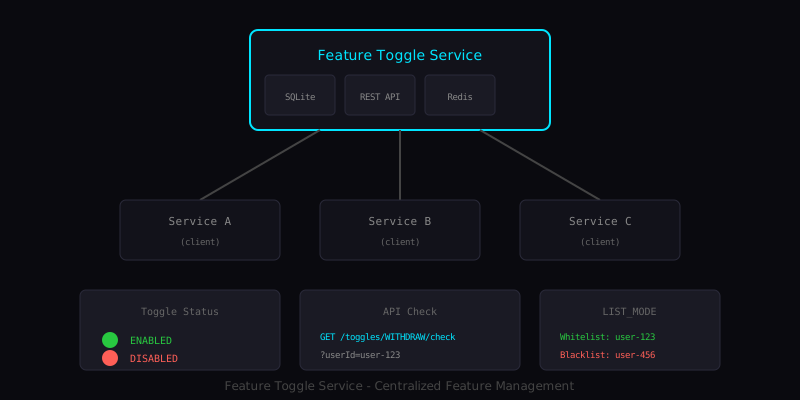
The Feature Toggle Service is an example microservice that demonstrates how to build a production-grade feature management system. It provides a centralized way to manage feature states across your entire microservices architecture, with SQLite for persistence and Redis for high-performance caching.
While I do not recommend directly using this in production without proper review and customization for your specific needs, it serves as an excellent starting point and learning resource. Why not give it a try in your development environment?
Note: This project is intended as an educational example and proof of concept. Adapt and extend it for your production requirements.
Why Feature Toggles Matter
In modern software development, the ability to control feature availability without code deployments provides significant advantages:
Gradual Rollouts
Instead of releasing a feature to all users at once, you can enable it for a small percentage first, monitor for issues, and gradually increase the rollout. If problems arise, you can instantly disable the feature without an emergency deployment.
Customer-Specific Features
Different customers may have different feature requirements. With feature toggles, you can enable premium features for paying customers, beta features for early adopters, or custom functionality for enterprise clients.
Kill Switches
When something goes wrong in production, having the ability to instantly disable a problematic feature can mean the difference between a minor incident and a major outage. Feature toggles provide that safety net.
A/B Testing
Feature toggles enable controlled experiments where different user groups see different versions of a feature, allowing data-driven decisions about which implementation performs better.
Architecture
The service follows a layered architecture designed for performance and reliability:
                Feature Toggle Service
  +-----------+  +------------+  +---------------+
  |  SQLite   |  |  REST API  |  | Cache Pub/Sub |
  | (persist) |  |  + HTML UI |  | (invalidate)  |
  +-----------+  +------------+  +---------------+
                       |
       +---------------+---------------+
       |               |               |
   Service A       Service B       Service C
    (client)        (client)        (client)
Core Components
SQLite Database - Provides lightweight, zero-configuration persistence. Perfect for development and small-scale deployments, with the option to migrate to PostgreSQL or MySQL for larger installations.
Redis Caching - Delivers sub-millisecond read performance with pub/sub cache invalidation. When a toggle changes, all connected clients are notified instantly.
REST API - A comprehensive API for managing toggles, whitelists, blacklists, and audit logs.
HTML Management UI - A built-in web interface for visual toggle management without requiring API calls.
Spring Boot Client - An auto-configured client library with annotations for seamless integration.
Toggle Statuses
The service supports three toggle states that cover most use cases:
| Status      | Behavior                                    |
|-------------|---------------------------------------------|
| ENABLED     | Feature is enabled for all users           |
| DISABLED    | Feature is disabled for all users          |
| LIST_MODE   | Check whitelist/blacklist for user access  |
The LIST_MODE status is particularly powerful, allowing fine-grained control over which users can access a feature. Users on the whitelist get access; users on the blacklist are denied; users on neither list fall back to a configurable default.
Implementation Details
Creating a Feature Toggle
Creating a new toggle is straightforward via the REST API:
curl -X POST http://localhost:8090/api/v1/toggles \
  -H "Content-Type: application/json" \
  -H "X-Actor: [email protected]" \
  -d '{
    "featureName": "WITHDRAW",
    "status": "ENABLED",
    "description": "Global withdraw feature",
    "groupName": "payment"
  }'
The X-Actor header enables audit logging, tracking who made each change and when.
Checking Feature Status
Clients can check if a feature is enabled for a specific user:
curl "http://localhost:8090/api/v1/toggles/WITHDRAW/check?userId=user-123"
The response indicates whether the feature is enabled and provides context about why:
{
  "featureName": "WITHDRAW",
  "enabled": true,
  "reason": "ENABLED_GLOBALLY"
}
Whitelist and Blacklist Management
For features in LIST_MODE, you can manage user access through whitelists and blacklists:
# Enable feature only for specific users
curl -X PUT http://localhost:8090/api/v1/toggles/WITHDRAW \
  -H "Content-Type: application/json" \
  -d '{"status": "LIST_MODE"}'

# Add users to whitelist
curl -X POST http://localhost:8090/api/v1/toggles/WITHDRAW/whitelist \
  -H "Content-Type: application/json" \
  -d '{"userIds": ["user-123", "user-456"]}'
This pattern is useful for beta testing, where you want to enable a feature for specific users before a wider rollout.
Scheduled Toggle Changes
The service supports scheduling future toggle state changes:
curl -X POST http://localhost:8090/api/v1/toggles/WITHDRAW/schedule \
  -H "Content-Type: application/json" \
  -H "X-Actor: [email protected]" \
  -d '{
    "scheduledStatus": "DISABLED",
    "scheduledAt": "2026-02-01T00:00:00Z"
  }'
This is useful for planned maintenance windows or timed feature releases.
Client Integration
The companion Spring Boot client library makes integration seamless:
Programmatic Checks
@Service
@RequiredArgsConstructor
public class WithdrawService {

    private final FeatureToggleClient featureToggle;

    public void processWithdraw(String userId, String bankCode) {
        // Simple check
        if (!featureToggle.isEnabled("WITHDRAW", userId)) {
            throw new FeatureDisabledException("WITHDRAW", "Withdrawals are disabled");
        }

        // Or use requireEnabled (throws FeatureDisabledException)
        featureToggle.requireEnabled("WITHDRAW_BANK_" + bankCode, userId);

        // Process withdraw...
    }
}
Annotation-Based Checks
For cleaner code, use the @FeatureEnabled annotation:
@Service
public class WithdrawService {

    @FeatureEnabled(value = "WITHDRAW", userIdParam = "userId")
    public void processWithdraw(String userId, BigDecimal amount) {
        // Only executes if feature is enabled for user
    }

    @FeatureEnabled(value = "NEW_FEATURE", throwOnDisabled = false)
    public String getNewFeatureData() {
        // Returns null if feature is disabled (does not throw)
        return "data";
    }
}
Caching Strategy
The client implements a multi-tier caching strategy for optimal performance:
- Local Cache (fastest) - In-memory cache with configurable TTL
- Redis - Shared cache with pub/sub invalidation
- Service Call - HTTP call to the feature toggle service
- Safe Default - Fallback when service is unavailable
When a toggle is updated, the service publishes to Redis pub/sub, and all clients automatically invalidate their local cache. This ensures consistency while maintaining high performance.
Direct Redis Mode
For microservices sharing the same Redis instance, clients can read directly from Redis, eliminating HTTP overhead entirely:
feature-toggle:
  client:
    redis:
      enabled: true
      direct-mode: true  # Read directly from Redis
| Mode         | Latency  | Use Case              |
|--------------|----------|-----------------------|
| HTTP Mode    | 5-10ms   | Separate networks     |
| Direct Redis | 0.5ms    | Shared Redis instance |
Safe Defaults
A critical aspect of feature toggle systems is handling failures gracefully. The client supports configurable defaults for when the service is unavailable:
feature-toggle:
  client:
    global-default: DISABLED  # Default for unknown features
    defaults:
      WITHDRAW: DISABLED      # Critical: fail closed
      DEPOSIT: ENABLED        # Non-critical: fail open
      NEW_UI: ENABLED         # Low risk: fail open
For sensitive operations like withdrawals or payments, always use DISABLED as the default. This ensures that if the feature toggle service is unreachable, critical operations fail safely rather than allowing potentially problematic transactions.
Monitoring and Observability
The service exposes Prometheus metrics for monitoring:
- Toggle check counts and latencies
- Cache hit/miss ratios
- Redis connection health
- Database query performance
Health checks are available via Spring Actuator:
curl http://localhost:8090/actuator/health
Use Cases
Payment Systems
In financial applications, feature toggles provide critical control:
- Disable withdrawals during maintenance
- Enable new payment methods for specific users first
- Kill switch for fraud detection systems
Product Launches
Coordinate feature releases across teams:
- Enable features at a specific time
- Gradual rollout to increasing user percentages
- Quick rollback if issues are detected
Multi-Tenant Applications
Manage features across different customer tiers:
- Premium features for paying customers
- Beta features for early adopters
- Custom features for enterprise clients
Lessons Learned
Building this service provided several insights:
- Caching is essential - Feature checks happen frequently; without caching, the service would become a bottleneck
- Safe defaults matter - When the service is unavailable, the system must behave predictably
- Audit logging is valuable - Knowing who changed what and when helps with debugging and compliance
- Pub/sub invalidation - Real-time cache invalidation ensures consistency without sacrificing performance
- Keep it simple - SQLite provides sufficient persistence for many use cases without operational complexity
Conclusion
Feature toggles are a fundamental capability for modern software systems. They provide the flexibility to control feature availability without code deployments, enable gradual rollouts, and provide safety nets for production incidents.
The Feature Toggle Service demonstrates how to build a complete feature management system with caching, client libraries, and management interfaces. While it is designed as an educational example, the patterns and approaches it demonstrates are applicable to production systems.
The complete source code is available on GitHub. Feel free to explore, learn from it, and adapt it for your own needs.
This project was developed as an educational resource demonstrating feature toggle patterns for microservices architectures.
Technologies Used
Database
Other
Related Projects
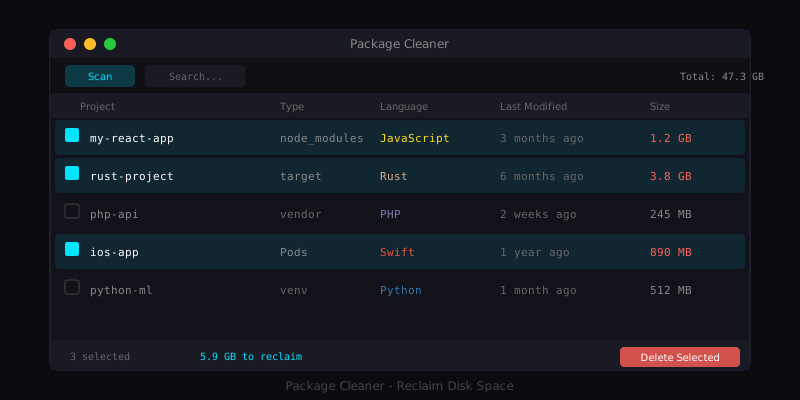
Package Cleaner for macOS
A native macOS application that helps developers reclaim disk space by finding and removing package dependency directories.
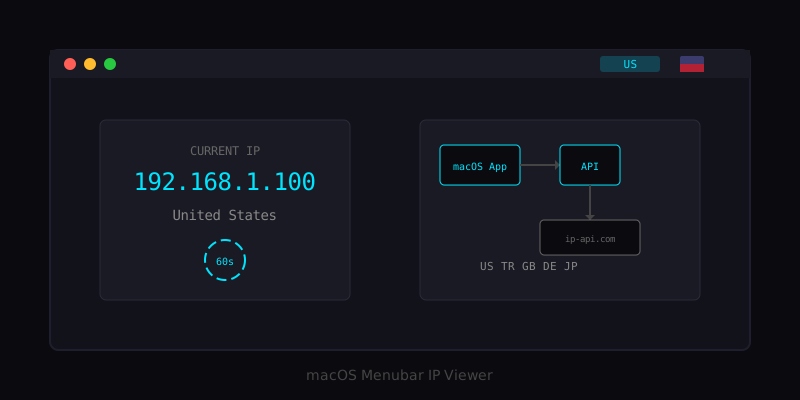
macOS Menubar IP Viewer
A menubar application that displays your current IP address with country flag for VPN users.
Have a project in mind?
Let's work together to bring your ideas to life. Our team of experts is ready to help you build something amazing.